
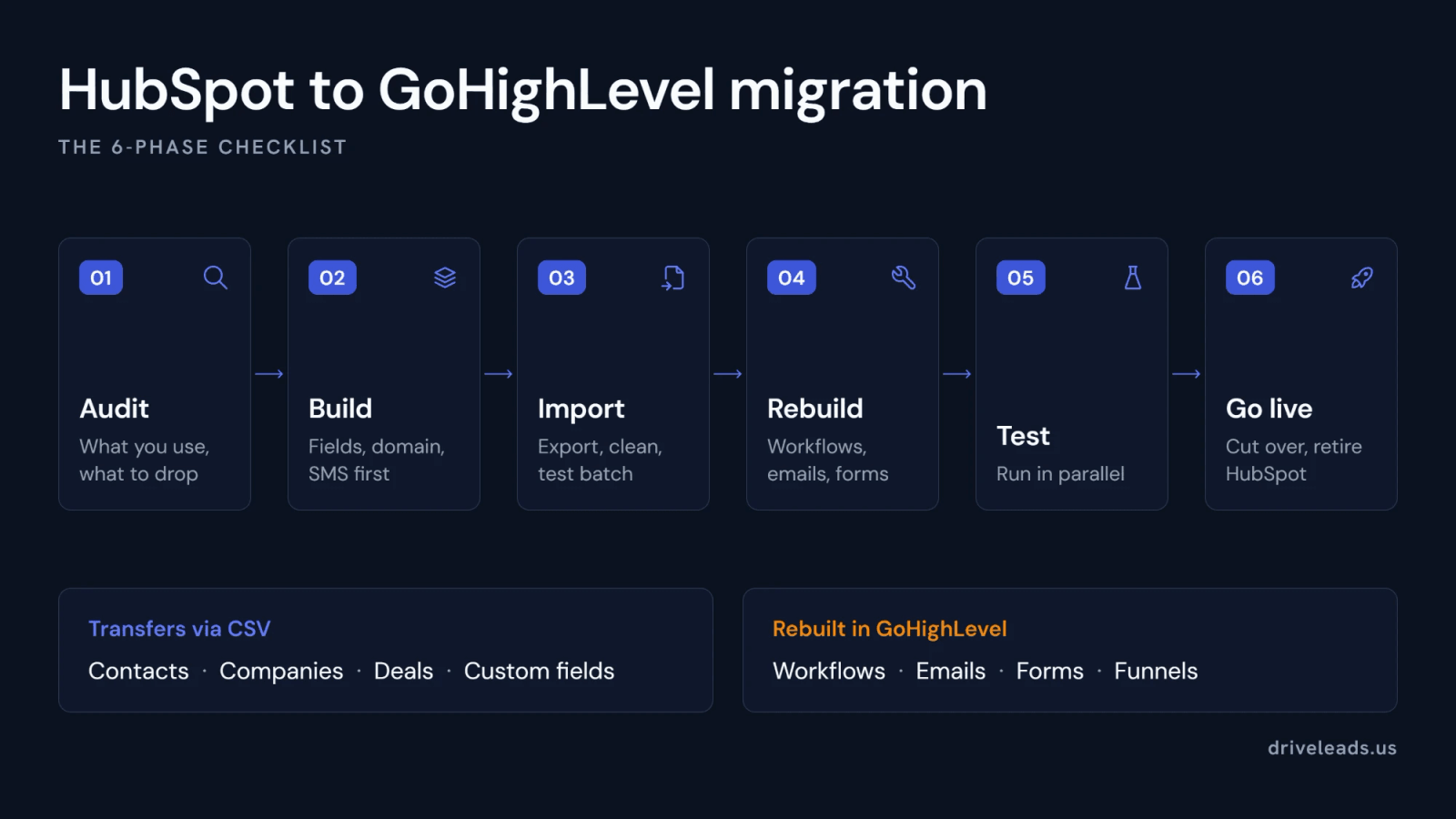
Moving your business off HubSpot is less scary than it looks, as long as you know what actually transfers and what has to be rebuilt. The mistake that causes data loss is treating a migration like a single button. It is not. It is an export, a careful field mapping, an import, and a rebuild of the parts that do not move. Do those in the right order and you can switch to GoHighLevel without dropping a single contact.
Can You Migrate from HubSpot to GoHighLevel Without Losing Data?
Yes. Your core records, contacts, companies, and deals, move into GoHighLevel as contacts, companies, and opportunities, custom fields included, either through HighLevel’s own HubSpot Importer or through CSV exports from HubSpot. What does not carry over is the logic layer: workflows, email templates, forms, funnels, and reports. None of that is lost, it simply has to be rebuilt in the new platform. So the honest answer is that your data is safe, but your automations are a rebuild, not a transfer.
What Transfers and What You Rebuild
Knowing this split up front is what prevents surprises. Everything on the left moves through HighLevel’s HubSpot Importer or a CSV export and import. Everything on the right is recreated inside GoHighLevel, which is usually a good moment to clean up automations you no longer need.
| Transfers via the importer or CSV | Rebuilt in GoHighLevel |
|---|---|
| Contacts and their field values | Workflows and automations |
| Companies | Email templates and sequences |
| Deals, imported as opportunities | Forms and landing pages |
| Pipelines and stages | Funnels and websites |
| Custom fields (HubSpot properties) | Reports and dashboards |
| Notes, tasks, and emails (via the importer; emails are read-only) | |
| Tags and list membership (via mapping) |
The rebuild column looks like extra work, and it is, but it is also the upside of a migration. Most HubSpot accounts carry years of half-used workflows, dead forms, and email sequences nobody maintains. Recreating them in GoHighLevel forces a cleanup, so you land in the new platform with only the automations that still earn their place instead of importing the clutter along with the data.
HubSpot to GoHighLevel Migration Checklist: 6 Phases
The order matters. Audit before you touch anything, build the GoHighLevel account before any data moves, and test everything before you rely on it. These phases follow the same arc as HighLevel’s own HubSpot to HighLevel migration guide, with the practical checks we add on top.
Phase 1: Audit before you touch anything
- List what you actually use. Contacts, companies, deals, active workflows, pipelines and stages, forms, email templates, custom properties, and every integration.
- Flag dead weight. Any workflow that has not fired in 90 days, any pipeline stage nobody uses, any segment for a campaign that no longer exists. Decide now what you will not migrate.
- Note your communications. Your sending domain and its authentication, any calling or SMS you run through HubSpot, and the phone numbers involved.
- Take a full backup. Export everything you can and keep the files dated and organized.
Phase 2: Build the GoHighLevel account first
Build the receiving environment before a single contact is imported. Importing into an empty account is the most common way fields end up mismatched.
- Create custom fields, tags, and pipelines that match the structure you documented, so every imported record has somewhere to land.
- Set up your sending domain and authenticate it with SPF and DKIM before you send anything. HighLevel’s guide to setting up email, phone, and SMS walks through it.
- Set up phone and SMS. Texting US recipients requires registration, so start A2P 10DLC brand and campaign registration now. Carrier approval is not instant, and you do not want your first campaign waiting on it.
- Decide what happens to each integration. Keep it and reconnect it, replace it with a native GoHighLevel feature, rebuild it, or retire it.
Phase 3: Export, clean, and import
- Choose your route. HighLevel’s HubSpot Importer connects to your HubSpot account and imports supported data directly: contacts, deals as opportunities, companies, custom fields, pipelines and stages, notes, tasks, and emails. HighLevel recommends using a clean account, turning on Allow duplicates for the import, and testing outside production first. CSV import remains the route for anything the importer does not cover.
- If you use CSV, export contacts, companies, and deals, including the custom properties you rely on.
- Clean before importing. Remove hard bounces and unsubscribes, dedupe records that share an email or phone number, and standardize phone numbers and dates.
- Map every HubSpot property to a matching GoHighLevel field, and double-check the custom ones.
- Import a test batch first, roughly 50 to 100 contacts, and confirm the fields landed correctly before loading the full list.
- Spot-check after the full import. Open a few dozen random records and confirm values, tags, and pipeline stages match the source.
Ready to move on when: your sample records match HubSpot exactly, custom fields hold the expected values rather than blanks, tags match what you mapped, and no unexpected duplicates appeared.
Phase 4: Rebuild automations, emails, and forms
This phase takes the longest and is the one most often underestimated. Rebuild the workflows, email templates and sequences, forms, and funnels that survived your audit, since none of them transfer. If you used HubSpot for calling or SMS, rebuild that in GoHighLevel’s conversations inbox as well.
Phase 5: Test and run in parallel
Run test contacts through every automation, confirm forms and integrations fire the way they should, and keep HubSpot read-only during a short overlap so you always have a source of truth.
Ready to cut over when: every automation has run end to end on test contacts, forms are ready to be repointed, your sending domain is authenticated, SMS registration is approved or in progress, and your team knows where to find things.
Phase 6: Go live and retire HubSpot
Repoint your forms and integrations to GoHighLevel, train your team, and watch the first week closely. Cancel HubSpot only after the new system has proven itself, then do a short review of what broke and what you can simplify.
Budget your time around the rebuild, not the data. The export and import of contacts and opportunities is usually the fastest part, often a day or two. Recreating and testing your automations, forms, and funnels is where the real hours go, so plan the overlap window around that work rather than assuming the whole move is a single afternoon.
How to Avoid Data Loss and Downtime
Most migration horror stories come from skipping the boring steps. A few habits keep the move clean and the business running while you switch.
Do not skip this: Never delete or cancel HubSpot until GoHighLevel is fully rebuilt, tested, and live. Keep the old system read-only during the overlap so you always have a source of truth to check against, and export a full backup of your HubSpot data before you touch anything.
The other safeguard is testing in small batches. Import a handful of contacts, confirm the fields mapped correctly, then scale up. It is the same discipline whether you are moving to GoHighLevel or handling a HubSpot implementation in the other direction, and it is what separates a clean cutover from a week of cleanup.
HubSpot to GoHighLevel Migration Service: What It Includes and Costs
A migration service takes the six phases above off your plate. In our GoHighLevel setup, CRM migration is part of the work: we audit the HubSpot account, build the GoHighLevel account and its sending and SMS infrastructure, move your contacts, companies, and deals, rebuild the automations that survived the audit, and test everything on real records before cutover. We also tell you up front which parts will not transfer, such as deep activity history and bespoke integrations, and rebuild them rather than claim a clean copy.
On price, a core GoHighLevel setup runs $2,500 to $4,000, and a setup that includes CRM migration runs $4,000 to $8,000, both one-time and separate from the HighLevel subscription. The migration is what moves a project up that range, which is why we scope it after a conversation about what you are moving, not before. You can see the full scope and timeline on our GoHighLevel setup service page.
Should You Migrate Yourself or Get Help?
A self-managed migration is realistic if your HubSpot setup is simple, a clean contact list and a couple of pipelines. The effort climbs fast when you have complex workflows, many custom fields, integrations, and years of data to preserve. That is where the rebuild, not the data, becomes the real work, and where a done-for-you setup pays for itself by getting the automations right the first time. You can see how full migrations land in our client case studies.
If you have not fully committed to the switch yet, it is worth confirming the platforms fit before you move. Our take on how GoHighLevel compares to HubSpot as a stack walks through where each one wins so the migration is a decision, not a regret.
Planning a move off HubSpot? Tell us what you are migrating and we will scope the build, quote a fixed price, and map exactly what transfers, what to rebuild, and how to cut over without downtime.